Panasonic DP-2000 Manual de usuario Pagina 12
- Pagina / 180
- Tabla de contenidos
- SOLUCIÓN DE PROBLEMAS
- MARCADORES

- DP-2000/2500/3000 1
- Energy Star 2
- Table of Contents 3
- Precautions 5
- External View 6
- INTERNET 7
- Control Panel (For DP-2000) 8
- Installing the Printer Driver 11
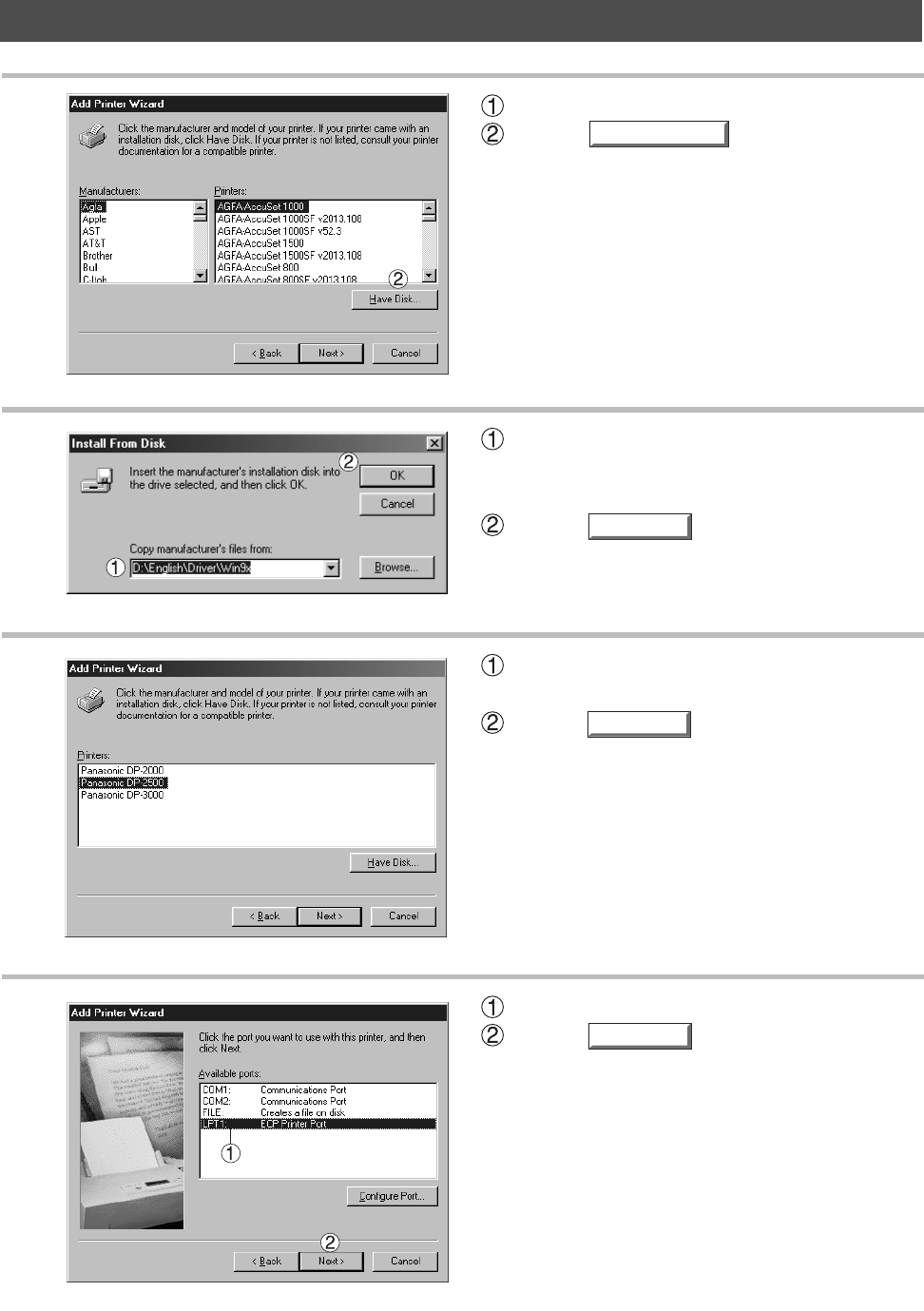
- Have Disk 12
- Printer Section 13
- Browse 17
- Print Test Page 17
- Delete Port 18
- New Driver 18
- Add Port 18
- Spool Settings 19
- Port Settings 19
- Restore Defaults 21
- About 25
- <For DP-2500/3000> 26
- <For DP-2000> 26
- Continue 28
- New Port 30
- Separator Page 35
- Print Processor 36
- Delete Port...Add Port 37
- Configure Port 37
- Permissions 40
- Auditing 40
- Ownership 40
- Halftone Setup 41
- Properties 43
- Metafile Spooling 46
- Binding Margin 46
- Advanced Tab 46
- Output Tray 48
- Secure Print 48
- Halftone Color Adjustment 48
- Settings 52
- Printing Preferences 58
- Additional Drivers 59
- Add Port... Delete Port 60
- Printing Defaults 62
- Advanced 63
- Add... Remove 63
- Print Operation 74
- Printing on Network 75
- Class 2 Fax Modem 78
- Installation (Windows NT 4.0) 84
- Installation (Windows 2000) 87
- System Section 95
- Document Management 95
- Document Manager 100
- Setting Plug-in 101
- File Menu 103
- Edit Menu 108
- View Menu 109
- Document Menu 110
- Document Scanner 112
- Zoom OutZoom In 114
- Tool Menu 115
- Image Scanning 117
- Document Viewer 119
- Basic Operations 121
- Annotation Function 122
- Page Menu 128
- Annotation Menu 129
- Add Stamp 134
- Detect Skew 136
- Status Monitor 140
- Task Bar Menu 141
- Display Status Details 142
- Configuration Editor 145
- User Parameters Folder 147
- Fax Parameters Folder 148
- Copier Settings Folder 149
- General Functions Folder 150
- Journal Folder 151
- Phone Book Editor 153
- Activation Procedure 154
- Main Window (For DP-2000) 156
- Retrieve/Write 157
- Open/Save File 159
- Insert Entry 161
- Delete Entry 162
- Troubleshooting 163
- Adding Paper( ) 166
- Removing a Misfeed Paper 169
- Pull out the finisher 170
- Lift up the lever and clear 170
- Push the latch to open the 171
- Remove the misfed paper 171
- Remove misfed paper 172
- Open the right cover 172
- Automatic Duplex Unit 173
- Close the right cover 173
- Appendix 177
- Parallel Interface Connector 178
- WARRANTY 180
- U.S.A. only 180
Relacionado con productos y manuales para Impresoras Panasonic DP-2000
 (24 paginas)
(4 paginas)
(65 paginas)
(82 paginas)
(80 paginas)
(24 paginas)
(138 paginas)
(112 paginas)
(88 paginas)
(161 paginas)
(104 paginas)
(16 paginas)
(40 paginas)
(92 paginas)
(6 paginas)
(120 paginas)
(84 paginas)
(106 paginas)
(24 paginas)
(4 paginas)
(65 paginas)
(82 paginas)
(80 paginas)
(24 paginas)
(138 paginas)
(112 paginas)
(88 paginas)
(161 paginas)
(104 paginas)
(16 paginas)
(40 paginas)
(92 paginas)
(6 paginas)
(120 paginas)
(84 paginas)
(106 paginas)
 (234 paginas)
(100 paginas)
(234 paginas)
(100 paginas)
© 2020, manymanuals.es. Todos los derechos reservados | 0.058 s |
 Manymanuals.com
 Manymanuals.de
 Manymanuals.fr
 Manymanuals.it
 Manymanuals.pl
 Manymanuals.cz
 Manymanuals.es
 Manymanuals-pt.com
Comentarios a estos manuales